
 Galaxy CasinoGUIDE 03.1
Video poker
Choose which cards to hold, then draw to form a winning hand on the paytable.
From betting to drawing cards
Paytables and special rules vary by game. Check your selected game's paytable and TOTAL BET first.
- Use − / +, BET and HAND to set your bet and number of hands.
- Press DEAL to receive 5 cards.
- Select the cards you want to keep and check their HOLD markers.
- Press DRAW to replace the cards you did not HOLD and determine the result.
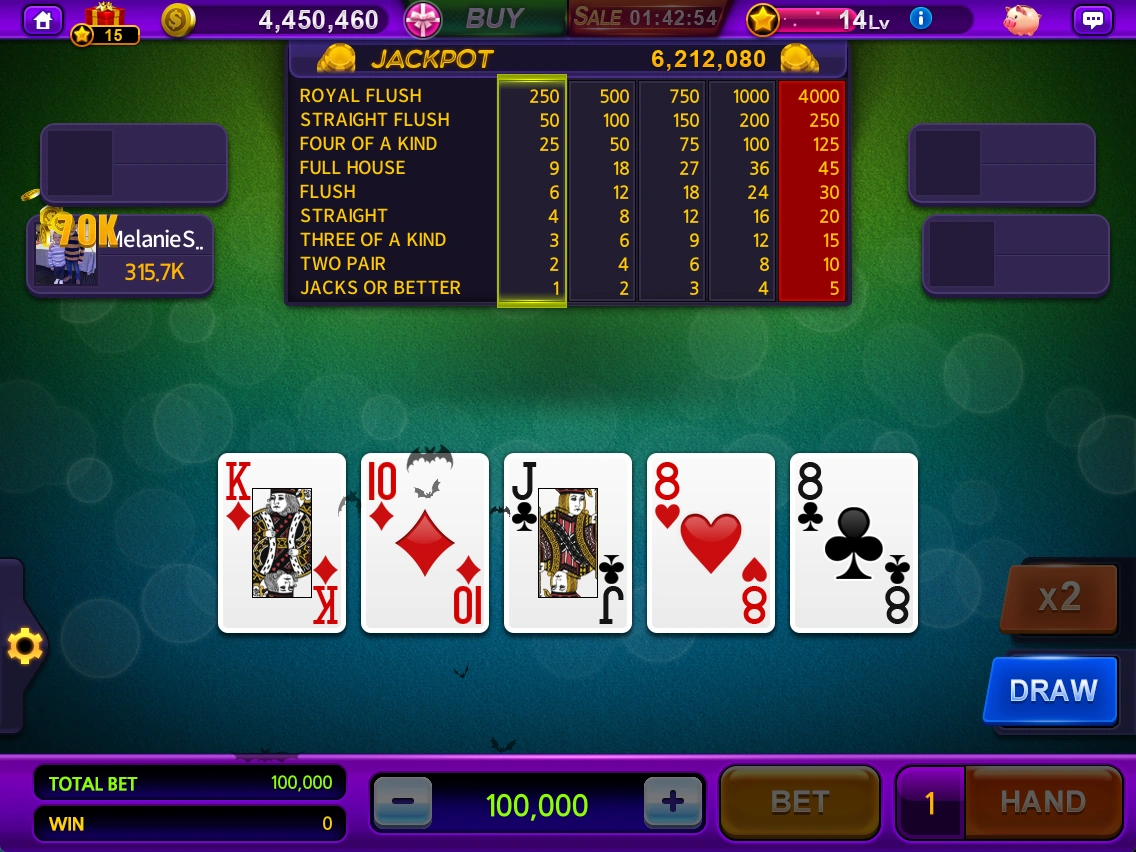
Paytables, multi-hand play & double up
The paytable at the top shows the column for your current BET level.
BET, HAND and TOTAL BET
BET changes the selected paytable level; HAND changes the number of hands played at once. Check the final TOTAL BET when selecting multiple hands. The HOLD choices on your initial cards also apply to multi-hand play.
Paytable
Check the payout conditions for each hand. In the JACKS OR BETTER screenshot, the ROYAL FLUSH payout increases substantially at BET level 5. Check each game's own table rather than assuming other games use the same payouts.
x2
When x2 becomes available after a win, you can try the double-up game. Before proceeding, read the displayed rules and how each result affects your winnings.
Screenshots were taken on October 21, 2026 and are examples. Check the latest in-game information for prices, balances, rewards and event conditions.
Button names match the English labels shown in the game.